


Blog The suits Shows/Projects FAQ Amundsen Slade gallery Contact Links video

How to bypass a Datatool System 3 Motorcycle Alarm

15/09/2011

16 Comments

 
Picture
Picture
Not exactly Sonic Sideshow information I know - but damn useful all the same. And it’s kind of hacking… anyway what good is a sideshow without transport?

The alarm systems go off all the time when you’re not wanting them to, get tired and lock you out of your own bike in remote lay-bys, drain the battery when the bike’s in storage, cost loads of you loads of money and generally are a bit crap. Basically if you want to look after your bike, you need to get a shed. You probably need one anyway.

I suppose people might be a bit cagey about the wiring information as a security measure, but that means that it costs hundreds of pounds to install an alarm, and then loads more to take it out again when it breaks. A decent install splices the alarm into the guts of the bikes main wiring loom so to work out what each cable does from first principles you have to get pretty intimate with the innards. Also all the cables come with colour code tags for install, but all the cables are black, so that after install you can’t tell what is what.

There are two big cable connectors on the inside, one block of six and one of eight. Here are those colour codes:

Orange –led indicator

Yellow/green – external alarm/ radio pager

Grey – led indicator

Green – protective trigger switch (to fire if a bike panel is lifted)

Green – protective trigger switch

Brown – to something that goes live with the ignition switch

Black x2 – earth

Red – power

***********************

White – immobilisation

White – immobilisation

Pink – indicators

Pink – indicators

Yellow –starter immobilisation

Yellow - starter immobilisation

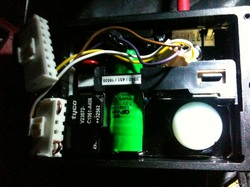
Stuff like indicators are just spliced onto the bikes main loom leaving it operational, so if you cut the power to the unit they just work as normal. But the immobilisation part cuts the main loom and sends the circuit via the alarm, so these have to be bridged. There’s normally a circuit break immobilising the starter motor, and another immobilising the ignition or fuel pump. These are controlled by the white and yellow tags on the smaller cable block. So just bridge both the whites, and bridge the yellows to bypass the unit while leaving all of the wiring in place (as shown in the photograph).

And that’s it. It’s such a relief to be rid of it!

If you're thinking of using this information to steal motorbikes - you're an asshole. Why not take up tech art? You'd be a natural.


16 Comments
 

Project Miniaturisation: (8) Midi problem on the Alesis io2 express with osx 10.6

03/08/2011

0 Comments

 
Picture
For those who have noticed that the Sonic Sideshow walkabout employs 'carryable' rather than 'wearable' technology Project Miniaturisation documents progress towards a new walkabout rig - an improved sampler program running on a small machine that we can wear.

In the run up to the first gig with our new set up I ended up going for the Alesis io2 USB audio/midi interface. On the upside it's small, light, cheapish and has midi included. On the downside it's noisy compared to the mbox, and I'm having midi issues.

Its plug and play on a mac, no drivers to upload, and so seemingly nothing you can do if it doesn't plug and play. Audio works straight off, MIDI is difficult. After a stretch where it sometime didn't work, sometimes did, but I never knew what I'd done right, i found that it only recognises the MIDI if you plug it in with the machine already running, but before you launch the program. What a faff. I can make it work, but i dont really want any 'secret handshakes' to be necessary when other people are using the kit in a stressfull giging situation. Can find nothing on the forums that relates to the mac. There was one person with exactly the same symptoms, but no answers. Seems this is a dead end.

Note: Find the 'Audio Midi setup' application in mac/applications/utilities

18/8/11
Might revert to the mbox one for walkabout rig.

I think it sounds better, I think it has better headroom for loud sounds, or perhaps it's that playback to headphone speakers is better. Also I want to know if the few random crashes I still have are to do with the alesis midi problem, the hackintosh or just the Dell itself.

Add Comment
 

Project Miniaturisation: (7) First gig - and disabling the lid-sleep function

29/07/2011

0 Comments

 
Picture
For those who have noticed that the Sonic Sideshow walkabout employs 'carryable' rather than 'wearable' technology Project Miniaturisation documents progress towards a new walkabout rig - an improved sampler program running on a small machine that we can wear.

Just back from the first gig using the new rig - and it performed alright! I usually want a couple of safety outings before I'll trust a new set up, but it was pretty well debugged so we went for it (with the old rig in the suitcase of course). Still several unexplained crashes though, hoping that it's mostly to do with the lid: the lid-sleep function on the hackintosh is not fully functional it crashes whenever the lid is closed.

Here's the salient bits of information:

The switch on the lid of a dell is magnetic, so no simple hack is possible.

Most of the information online seems to be about making the lid sleep function work normally, but i really want it to just stay awake.

here's a good blog on the hack
http://www.internmentcamp.com/2009/04/12/dell/os-x-on-the-dell-mini-9/
Speaks as many do of  "disabling USB Legacy Support in the BIOS". Dunno what that means but apparently it works if you want a normal sleep function.

An approach to making it sleep properly involving clamshell and lid sleep kexts.
http://www.meklort.com/?p=213

My dell mini seems to be a pretty good discussion forum.
http://www.mydellmini.com/forum/dell-mini-9-os-x-discussion/14762-mini-9-w-10-6-1-stop-sleep-after-lid-close.html
Important bit: The keyboard is designed as part if the cooling system on the dell mini so you can do some damage by disabling sleep function and running it with the lid closed. So I still have to keep the lid slightly open (rather than close it like i planned to save more space).

Heres the solution: InsomniaX
http://www.macupdate.com/app/mac/22211/insomniax
This disables the sleep function. Only problem remaining was to get the functionality loaded when the machine boots up. (Seemed unclear if I could do this from the forums, but it does work). InsomniaX has various preferences - Load on AC, load on battery, load on start. With InsomniaX already running these refer to when the 'disable sleep' function will be on, so select 'load on start' and the program will disable sleep as soon as it's launched.
To automatically load insomniaX itself go to : system preferences/system/accounts/loginitems and add insomniaX to the field.
Now InsomniaX will launch automatically when the machine boots up, and immediately disable the lid sleep function.

The same thing works for automatically loading the max file.

Add Comment
 

Project Miniaturisation: (6) Programming progress and imic failure

12/05/2011

0 Comments

 
Picture
For those who have noticed that the Sonic Sideshow walkabout employs 'carryable' rather than 'wearable' technology Project Miniaturisation documents progress towards a new walkabout rig - an improved sampler program running on a small machine that we can wear.

The new program has a file of playdata associated with each sample set (unlike the old one), so playback can be configured in a more flexible way. Trouble is I don't have play data for all the old sample sets. So I wrote a tool to save endvalues to the play data file while listening to the sample - this should speed up the creating of playdata files for the existing sample sets, now just have to trudge through them creating the files.

                                                                ********

Tried to get the record sequence to work well with the imic as interface -failed. Managed to improve it slightly by tweaking the values... but it's not really good enough. Needs to be stable so that the performers don't get confused. 
Think that there is too much noise on the interface for it to tell the difference between 'digital silence' and the open line. Have the feeling there are other problems too: it seems to be more latent than the mbox, making the triggering feel slightly confusing. Also it sounds like there is quite a big increase in the noise floor when I play back the sample (high end hiss), so the noise is going down to the recording.

Feel kind of like I'm out of time for fucking about with it as well. Might just get the physical side set up using an mbox.  It's not elegant, but it works, and it wont look that bad.
Add Comment
 

Project Miniaturisation: (5) Progress in Max/MSP

30/04/2011

0 Comments

 
Picture
For those who have noticed that the Sonic Sideshow walkabout employs 'carryable' rather than 'wearable' technology Project Miniaturisation documents progress towards a new walkabout rig - an improved sampler program running on a small machine that we can wear.

Got a simple load sequence working: set up a file of sampleset names, and several example files of sample sets. Got the load menu working, and its loading the file names and samples into the buffers.

(Embedded the file containing all the sampleset names in the patch. Searching the samples themselves by filepath, but have to search the sample sets by name and leave them somewhere in Max's search path. Seems a bit of a faff. Would like to search all by filepath so it's easy to configure on new machines, but can't seem to load a file to coll using a filepath. Can just hit the coll with a read message, open a dialog and load the file by hand... not as easy as it should be tho. Might make a little thing for altering Max's search path so Ill remember how easily)


Add Comment
 

Project Miniaturisation: (4) Experimenting with the new imic audio interface

20/04/2011

0 Comments

 
Picture
For those who have noticed that the Sonic Sideshow walkabout employs 'carryable' rather than 'wearable' technology Project Miniaturisation documents progress towards a new walkabout rig - an improved sampler program running on a small machine that we can wear.

This is the process of getting a balanced input from an SM58 mic to record into the computer at a decent level via the unbalanced imic input. I've been round the houses checking the XLR wiring protocols, and then found that I need an impedance transformer.

It seems to be phantom powered in mic mode and too quiet in line mode. Huge click when the mic switch is opened and closed in mic mode - going to give me triggering problems in the software.

Theres also a lot of noise. An earth hum off the mic (when not touched), and processor noise, not sure if this is to do with the way that I have wired the balanced> sterio sockets, or if it is just innate to going balanced>unbalanced. (Is this what an earth lift does?) Should I experiment with different wirings? (Also been to Maplin. £14 for their wiring solution: sterio 1/4" to mono rca, rca to (one!) male xlr)

Tempted at this point just to get a very cheap mbox1 and dismember it...

Here is the XLR wiring protocol:

pin2 signal (hot). pin3 inverse (cold), pin1 ground (shield)

How do ballanced inputs actually work?
Good article on balanced inputs: http://community.avid.com/forums/t/58612.aspx

There are three types:
Impedance balanced [cold tied to grnd via resistor matching the output imp of the hot]
grnd pin3 to pin1, or leave pin3 floating, makes no difference.

Transformer balanced [actively drive primary winding of output transformer]
grnd pin3 to pin1

Active balanced [actively drive both hot and cold outputs]
leave pin3 floating (or it draws from the transformer, stressing it)

(...So I think the earth lift on a DI disconnects pin3 from grnd. )

Ive tried it with cold to grnd - so try with a floating pin3 instead... Nope.


Right. Found it. It is an impedance matching problem.
Theres stuff on the Griffin site:
http://www.griffintechnology.com/articles/31
The Sm58 is a balanced low impedance output and the imic is an unbalanced high impedance input configured for using with sterio gear and high impedance electret microphones.
Low impedance seems to be below ~ 300 ohms, high above 1.5 K ohms.
Sm58 is rated at 150 (actual 300(?)) ohms.  Can't find any info on the imic.
I need to buy an impedance matching transformer.

Got a Maplin transformer for ~£9. Says its 500 ohms in and switchable 600 ohms/50 k ohms out.

Yup, thats a result! Got the SM58 triggering the new program well enough through the impedance transformer and imic. I'm using the high impedance setting with the mac system preferences slider on about 5/16ths. The sound floor does seem a bit high, but its definitely usable. Guess the first thing to do is to try and adjust the trigger sensitivity, see how good i can get it. (about £34 so far for this method, with so ~ £40 with another splitter to take the strain of the imic, and ~£49 to be able to do two separate mics. Not so cheap, but very small.)


Add Comment
 

Project Miniaturisation: (3) More audio interface research

14/04/2011

0 Comments

 
Picture
For those who have noticed that the Sonic Sideshow walkabout employs 'carryable' rather than 'wearable' technology Project Miniaturisation documents progress towards a new walkabout rig - an improved sampler program running on a small machine that we can wear.

Alesis IO2 express. 
£99 denmark st. ~ £80 online.  Pretty layout, but would be covered i guess.  Possibly marginally smaller/ lighter? than m audio... would be good to hold one - cop a feel of size and weight.

Behringer U control Uca202.
Small, good. Cheap, good. ~£25-£30. Has 2x2 in/out and a headphone with level control. Think the input levels are all software controlled. Downsides: not balanced inputs I assume,  think its only 16bit. But really easy to mount on the suits- should probly try it. >>>> Ah, no. This looks like a line level only input. Probly back to the drawing board.

Griffin imic.
Ok. Bought one of these. ~£19+ P&P, its small,light,cheap, has a mic level, supposed to be reasonable quality sound, capable of 24bit 48KHz. So heres hoping. Theres some useful Utube tutorial stuff, one of someone using an SM 58 with one, one of digitizing music. 
http://www.macworld.co.uk/digitallifestyle/reviews/index.cfm?reviewid=3262951&productid=3262965&pag

For completeness, Jack also mentioned these:
Alesis MultiMix 6 USB mixer.
~£90 on ebay (also used at good price). Really nice looking little usb mixing desk. (No midi course, also supprised to see it seems to be 16bit). 6 ins on the small one.
http://www.dolphinmusic.co.uk/article/4258-namm-2010-alesis-announces-multimix-6-usb-mixer.html


Add Comment
 

Project Miniaturisation: (2) Hackintosh Crashing Problems

11/04/2011

0 Comments

 
Picture
For those who have noticed that the Sonic Sideshow walkabout employs 'carryable' rather than 'wearable' technology Project Miniaturisation documents progress towards a new walkabout rig - an improved sampler program running on a small machine that we can wear.

Was trying to get the mbox to work on the dell so I can program and decide on a sound card/mic pre later. The Digidesign Standalone core audio driver somehow managed to crash the dell on boot, so I was locked out. 

SAFE MODE: I think this comes under the heading of 'too simple to mention how' for programmers, so here it is: boot up while holding the shift key> get a screen with a hard drive image.  Pangeup/pagedown keys give a menu of different boot options, there is also a help page on this menu with the command line codes for different boot options. I typed the safe mode command -x (which then appears in the bottom left corner of the screen) and hit enter. It booted up in safe mode. >  I manually removed the Digidesign folder from the apps folder. There is also supposed to be something you need to chuck: library/audio/plugins/HAL, but it wasn't there.

Seems the dell is running the newish osx10.6 and the Mbox 1 is nearly obsolite. I installed Standalone Digidesign CoreAudio Drivers v7.4.2 for Leopard [356937] successfully the second time (its compatible with mbox1, says for leopard, but also seems to manage snow leopard)

(The crashes seem to have come from me mistakenly loading the non stand-alone version).

This video is about removing a failed driver. Shows him booting in safe mode... but the screen looked different anyway.
http://www.youtube.com/watch?v=L3zPlqlxYbA
                                                                ******

Also looked into London Hackspace in Shoreditch. Would be a cool place to learn/do something specific.£5 min £25 average-required monthly.
http://wiki.hackspace.org.uk/wiki/GettingStarted

Add Comment
 

Project Miniaturisation: (1) Looking for a USB audio interface

10/04/2011

0 Comments

 
Picture
For those who have noticed that the Sonic Sideshow walkabout employs 'carryable' rather than 'wearable' technology Project Miniaturisation documents progress towards a new walkabout rig - an improved sampler program running on a small machine that we can wear.

So what I want is a cigarette packet sized interface with two balanced inputs (dont need phantom power) and a sterio out (head phone out would do). A small unit that included the MIDI in/out would be perfect, but it's easy enough to do the midi separately. 

Here's the issues:
Separate midi or same unit? Same could save space, but not if it only comes with over spec/sized boxes. I have 3 USBs so can do MIDI, sound, and have one left in case i need triggering from external keyboard mod.

Do I need duel inputs? We only take one mic out with us lately, so mono is recording to both sides of a sterio file (to maintain sterio architecture for preload samples) would be fine. Stopping interaction on both suits to record is a drag. Write a software solution? With sterio mics I could sense the open mic and prefer the hands of that person in the record sequence. (Hmmm. More coding. What happened to 'good-enough' design principles?)

What to spend? I want to keep the cost down so that i can scale to more suits.

How good should it be?  I want to keep record quality high enough not to be a drag musically. Did an experiment with the computers mic in, signel level was low and very noisy, also clippy, (some impedance problem?). Then thought about how much a notebook maker would spend on the sound card and sort of left it at that: It's got to be an external unit.

How am i going to get the outputs?
Can I use a mic pre to go in, and the laptop's headphones out? (Probably). If not then I need a fully fledged outboard mixer (eg the maudio fasttrak)

External battery? As far as I know the small mono pres have no battery option, so they would reduce battery life on the laptop, but that might not matter. Upside is, no extra battery to change.

Here are the products:

ART USB Dual Pre Portable Pre Amp
I like this, small USB duel pre. Battery/power/usb. About £75. Good if I go for duel inputs with separate midi.

http://www.google.co.uk/products/catalog?hl=en&safe=off&client=firefox-a&hs=fJI&rls=org.mozilla:en-GB:official&q=ART+USB+Dual+Pre.+Portable+Pre+Amp&um=1&ie=UTF-8&cid=13119046618475861477&sa=X&ei=NAajTbeLKYy4hAfbz_D-BA&ved=0CDIQ8wIwAg#

M-Audio FAst Track Pro 4X4 Mobile USB Audio/ MIDI Interface with preamp

Over spec. Has all kinds of other features. Also kinda over sized. Over priced? ~£150. But, has the ins and the outs, plus the midi. Good standard of preamp.
Blue Icicle : mono XLR>USB pre. ~ £50. 
Mono inline mic pre. (dont like its looks. But wont see em.)
http://www.gear4music.com/Recording-and-Computers/Blue-Icicle-XLR-to-USB-Coverter-and-Mic-Preamp/AJX

Micport pro : mono XLR>USB pre.
~ £150. What justifies the price? Headphones? bundled software?
http://www.dv247.com/computer-hardware/centrance-micport-pro-usb-mic-pre-amp--50912

Is this some chinese copy of the micport pro?
On ebay without a make name, ~£35. (16 rather than 24 bit, but hey)
http://cgi.ebay.co.uk/NEW-USB-Microphone-PC-Adapter-XLR-Mic-Pre-48V-Phantom-_W0QQitemZ370499487389QQcmdZViewItem?rvr_id=224381095833&rvr_id=224381095833&cguid=9a4f928d1250a0aad4959e05fbe2b20b#vi-desc


Add Comment
 
    Picture
    News, gigs, reviews, and maybe the odd related curiosity...

    Archives

    September 2011
    August 2011
    July 2011
    May 2011
    April 2011
    November 2010
    October 2010
    September 2010
    February 2010
    January 2010
    October 2009

    Categories

    All
    Bizarre
    Circus
    Design
    Development
    Education
    Festivals
    Friends
    Gigs
    Music
    Musician Makers
    Musician Makers
    Notes From The Lab
    Press
    Reviews
    Sci Fi
    Suits
    Tech
    Walkabout

    RSS Feed


  • Home
  • Suits
  • Shows/Projects
  • FAQ
  • Amundsen
  • Slade
  • Gallery
  • Contact
  • Links
  • Max/Msp
  • Blog
  • Video